
A custom integration is the right approach when you need to connect your own telephony stack or internal API to CallAIder instead of relying on a standard connector.
This article follows the practical rollout order:
- First, why this integration matters.
- Then, full API implementation details.
- Finally, connection steps inside the platform UI.
If you are a CTO, tech lead, backend engineer, or integration specialist, you can treat this guide as a production launch checklist.
Why this integration matters
Many teams see integration as “just importing calls.” In reality, custom integration provides stronger control, cleaner analytics, and much better operational predictability.
1) One source of truth for call analytics
You define what a valid call looks like, which attributes are sent, and how metadata is named. This eliminates mismatch between telephony/CRM data and platform analytics.
Benefits:
- fewer conflicts about numbers;
- better auditability;
- stable data quality across teams.
2) Rich business context per call
Through properties, you can pass dimensions often unavailable in standard connectors:
- department or queue;
- customer segment;
- customer city/region;
- internal status (for example, issue resolved);
- internal quality score or priority.
This allows meaningful filtering and segmentation instead of raw volume views.
3) Filtering aligned with real workflows
With propertyFilters, you can import only relevant conversations:
- support calls for VIP clients;
- inbound calls from selected locations;
- calls in a target quality range.
This is critical when teams have different KPIs and must analyze different subsets.
4) Security and controlled access
X-Secret-Key provides a strict API access layer. You can combine it with your own controls: IP allowlist, rate limits, request logs, and secret rotation.
5) Scalability without manual work
Once integration is correctly implemented, manual exports/imports disappear. Calls flow automatically, and analytics runs continuously.
6) Better fit for non-standard architecture
Custom API is often the only reliable option when you have:
- multiple telephony providers;
- custom identity/normalization logic;
- CRM/ERP-enriched call metadata;
- strict recording-access requirements.
When to choose Custom Telephony
Use Custom Telephony when:
- your provider is not available among built-in connectors;
- you need additional call metadata for filtering;
- contract-level control and data quality are mandatory;
- departments require different import criteria;
- segmentation depends on internal business fields.
End-to-end flow
At a high level:
- You create a Custom API integration in CallAIder.
- CallAIder checks
/health. - CallAIder reads operators from
/contacts. - CallAIder requests calls from
/callsusing time range and optional filters. - CallAIder reads recordings via
/calls/:id/recording. - If
/properties/schemais implemented, team setup shows an extra properties filter step.
What to prepare before implementation
Before coding, align internally:
- public API base URL;
- secret key policy for
X-Secret-Key; - field mapping from telephony source to CallAIder contract;
- naming convention for
properties; - recording URL policy (permanent or temporary links);
- logging and monitoring policy.
API implementation details
This is the core technical contract your backend must support.
Global requirements
- JSON request/response payloads.
X-Secret-Keyvalidation on all integration endpoints.- predictable status codes (
200,401,404,500). - unified error shape.
- only completed calls in
/calls.
Recommended error response:
{
  "status": "error",
  "message": "Error details"
}
Authentication with X-Secret-Key
Every request from CallAIder includes:
X-Secret-Key: <your_secret_key>Your API must:
- validate key before business logic;
- return
401 Unauthorizedif key is missing/invalid; - log rejected requests safely.
Minimal middleware:
function auth(req, res, next) {
  if (req.headers['x-secret-key'] !== process.env.CALLAIDER_SECRET) {
    return res.status(401).json({ status: 'error', message: 'Unauthorized' });
  }
  next();
}
Endpoint 1: GET /health
Purpose: connectivity check used during integration setup.
Request:
GET {your_api_url}/health
X-Secret-Key: <secret>
Response:
{ "status": "success" }Endpoint 2: GET /contacts
Purpose: return available operators.
Request:
GET {your_api_url}/contacts
X-Secret-Key: <secret>
Response example:
{
  "contacts": [
    {
      "id": "101",
      "phone": "+380971234567",
      "name": "John Carter",
      "department": "Sales"
    }
  ]
}
Fields:
id(string, required): stable unique operator ID;phone(string, required): operator phone number;name(string, required): operator name;department(string, optional): department name.
Endpoint 3: POST /calls
Purpose: return completed calls for a time range.
Request:
POST {your_api_url}/calls
Content-Type: application/json
X-Secret-Key: <secret>
Request body example:
{
  "startTime": 1709500000,
  "stopTime": 1709586400,
  "direction": "incoming",
  "operators": ["101", "102"],
  "propertyFilters": {
    "Department": ["sales", "support"],
    "Quality score": {
      "mode": "all",
      "conditions": [
        { "operator": "gt", "value": 2 },
        { "operator": "lt", "value": 8 }
      ]
    }
  }
}
Request fields:
startTime(number, required): period start (Unix seconds);stopTime(number, required): period end (Unix seconds);direction(string, optional):incomingoroutgoing;operators(string[], optional): filter by operator IDs;propertyFilters(object, optional): additional property filters.
Supported propertyFilters formats
- Exact value:
{ "Client city": "Kyiv" }- One-of list:
{ "Department": ["sales", "support"] }- Numeric conditions with
alloranymode:
{
  "Quality score": {
    "mode": "any",
    "conditions": [
      { "operator": "gt", "value": 10 },
      { "operator": "lt", "value": 5 }
    ]
  }
}
Numeric operators:
eqnegtgteltlte
If mode is omitted, default is all.
Critical behavior: backend propertyFilters implementation is optional
There are two valid modes:
- Recommended mode: your API applies
propertyFiltersdirectly. - Fallback mode: your API ignores
propertyFiltersand returns calls filtered bystartTime,stopTime,direction,operators; CallAIder then performs post-filtering on platform side usingcalls[].properties.
Important: backend-side implementation of
propertyFiltersis NOT mandatory. Integration still works if property filtering is performed by CallAIder on platform side.
For fallback mode to work correctly:
- return
propertiesfor calls where additional filtering is needed; - if
/properties/schemaexists,propertieskeys must match schema keys; - if
/properties/schemais absent, keys may be arbitrary, but values should be primitive:string,number,boolean.
POST /calls response example
{
  "calls": [
    {
      "id": "call-abc-123",
      "clientNumber": "+380501234567",
      "clientName": "Client One",
      "direction": "incoming",
      "duration": 185,
      "startTime": 1709586000,
      "endTime": 1709586185,
      "operatorId": "101",
      "operatorName": "John Carter",
      "operatorNumber": "7545",
      "whoHungUp": "client",
      "properties": {
        "Department": "support",
        "Client city": "Lviv",
        "Issue resolved": true,
        "Quality score": 72
      }
    }
  ]
}
Call fields:
id(string, required): unique call ID;clientNumber(string, optional): client phone;clientName(string, optional): client name;direction(string, required):incomingoroutgoing;duration(number, required): call duration in seconds;startTime(number, required): call start timestamp;endTime(number, optional): call end timestamp;operatorId(string, required): operator ID;operatorName(string, required): operator name;operatorNumber(string, required): operator number;whoHungUp(string, optional):operator,client, orsystem;properties(object, optional): additional call properties.
Important notes:
- return completed calls only;
- do not return active/missed calls;
propertiesis optional for basic import;propertiesis required for additional filtering scenarios.
Endpoint 4: GET /properties/schema (optional; used for flexible import setup)
This endpoint is optional and is only needed for flexible dialog import configuration during team setup.
It is not required for base integration operation.
Request:
GET {your_api_url}/properties/schema
X-Secret-Key: <secret>
Response example:
{
  "properties": [
    { "key": "Department", "type": "enum", "values": ["sales", "support", "retention"] },
    { "key": "Client segment", "type": "enum", "values": ["standard", "vip"] },
    { "key": "Client city", "type": "string" },
    { "key": "Issue resolved", "type": "boolean" },
    { "key": "Quality score", "type": "number" }
  ]
}
Schema fields:
key(string, required): property key;type(string, required):string,number,boolean, orenum;values(array, optional): allowed values.
If this endpoint is not implemented:
- return
{ "properties": [] }, or - return
404 Not Found.
Integration still works. The platform simply skips the advanced properties configuration step.
Schema vs properties:
/properties/schemadefines available property filters in team setup;calls[].propertiescarries actual values per call;calls[].propertiesis used for additional filtering during import and in dialogs filters.
Endpoint 5: GET /calls/:id/recording
Purpose: return recording URL for a call.
Request:
GET {your_api_url}/calls/123/recording
X-Secret-Key: <secret>
Response:
{
  "url": "https://your-storage.com/recordings/call-abc-123.mp3",
  "filename": "call_recording_call-abc-123.mp3",
  "mimeType": "audio/mpeg"
}
Fields:
url(required)filename(optional)mimeType(optional)
If recording is unavailable, return 404 Not Found.
Response code matrix
200success401unauthorized404not found500internal error
Production recommendations
- deduplicate by
call.id; - add request/response logs with correlation IDs;
- enforce timeout and retry strategy;
- monitor endpoint error rates;
- alert on sudden import-volume drops.
Connect integration in CallAIder (after API is ready)
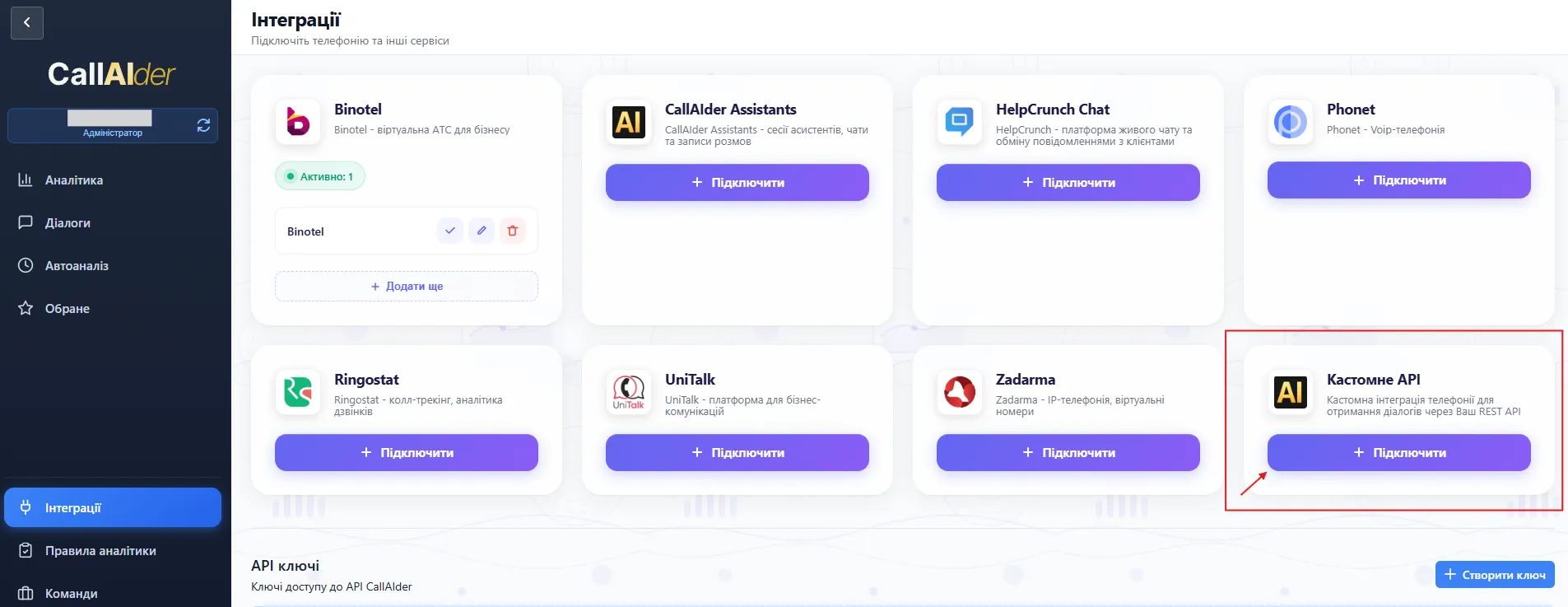
Step 1. Create Custom API connection
- Open Integrations.
- Find Custom API card.
- Click Connect.
Fill in:
- Connection name
- API URL
- Secret Key
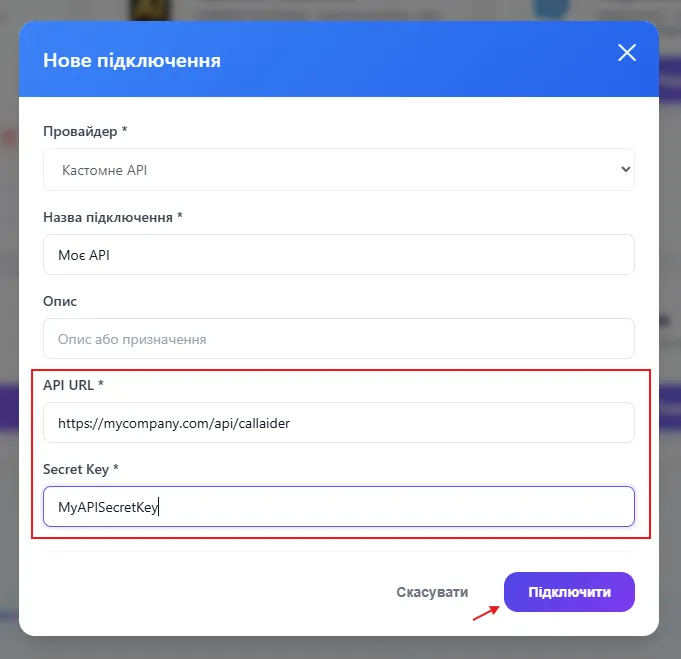
After save, CallAIder validates connectivity via /health.
Step 2. Create a team for this integration
Then create a team that defines operators, analytics rule, and optional property-based constraints.
Detailed wizard walkthrough:
Step 3. Configure properties in team wizard
If /properties/schema is implemented, the wizard shows the Properties step for flexible import filtering.
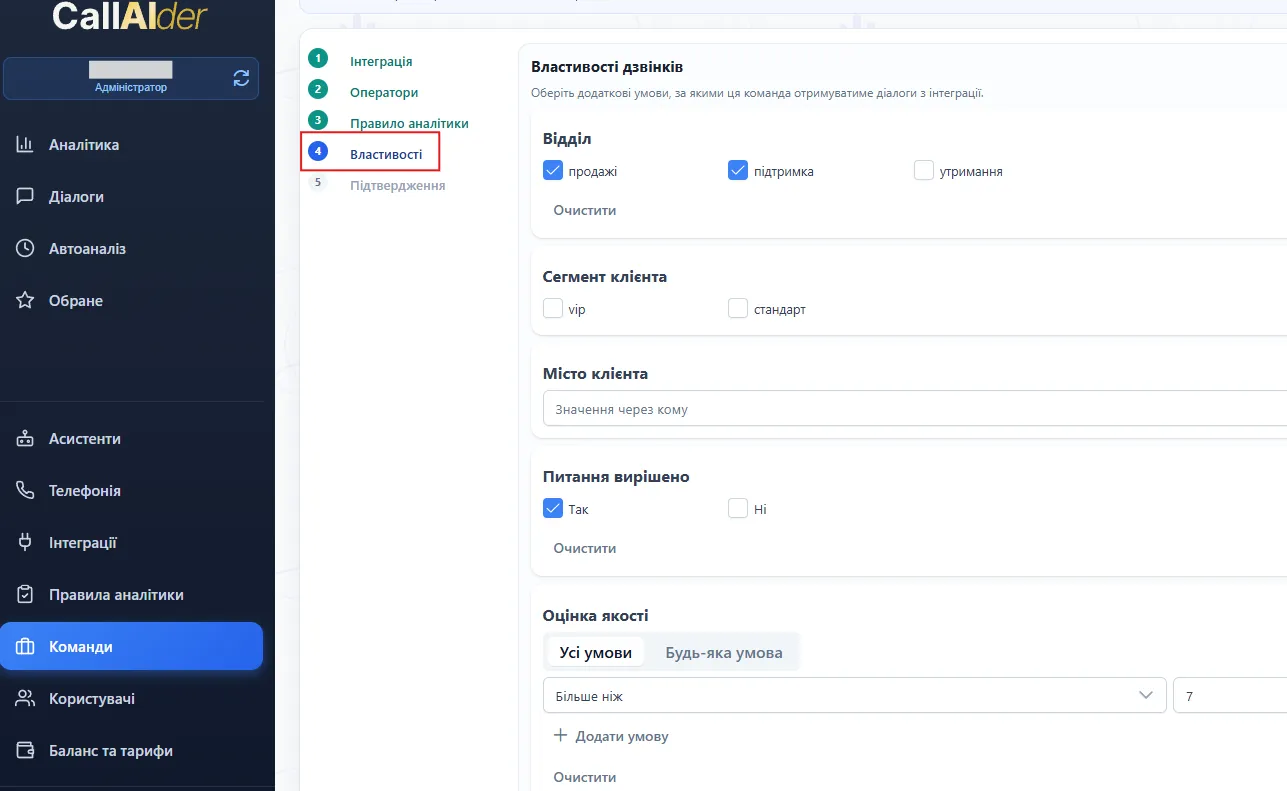
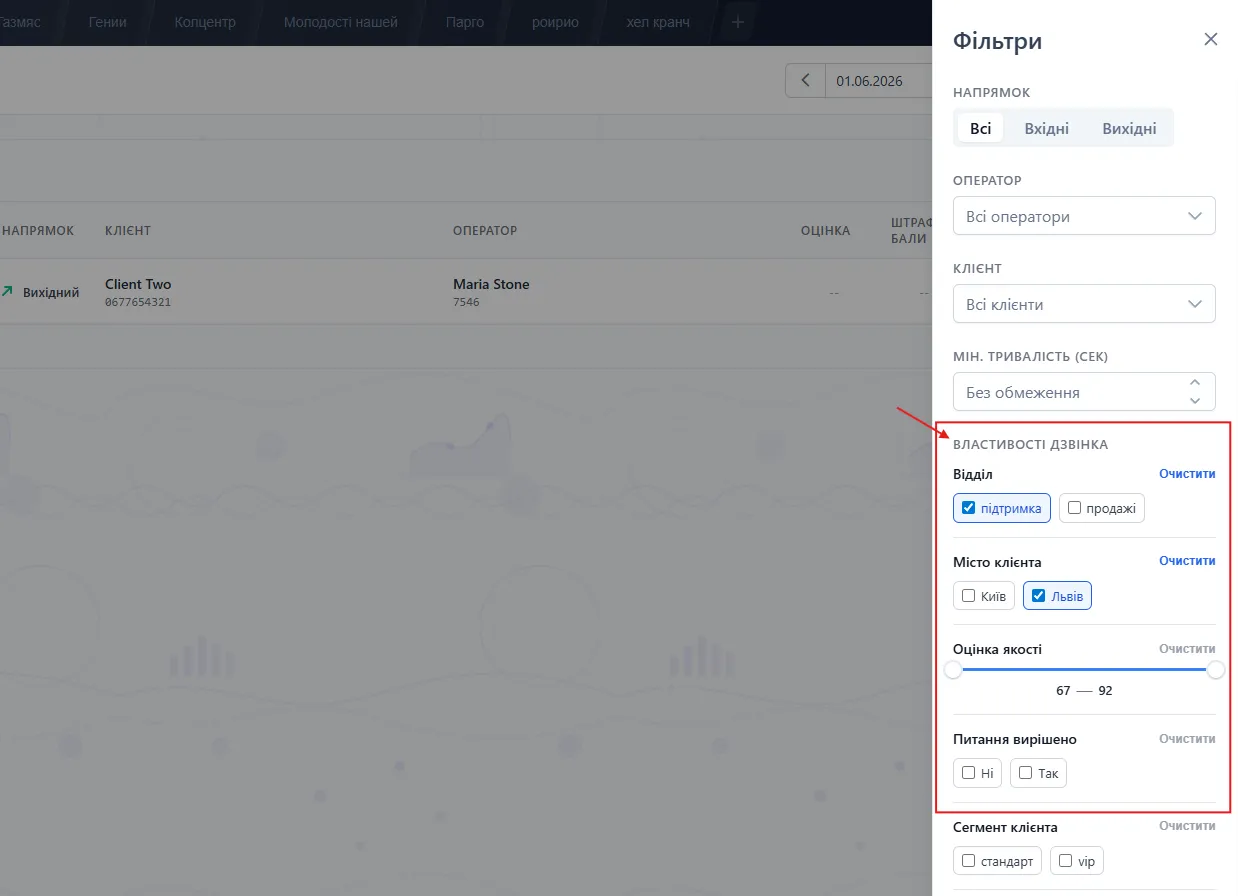
Additional filtering in Dialogs after import
After calls are imported:
- Open Dialogs.
- Click the filters button.
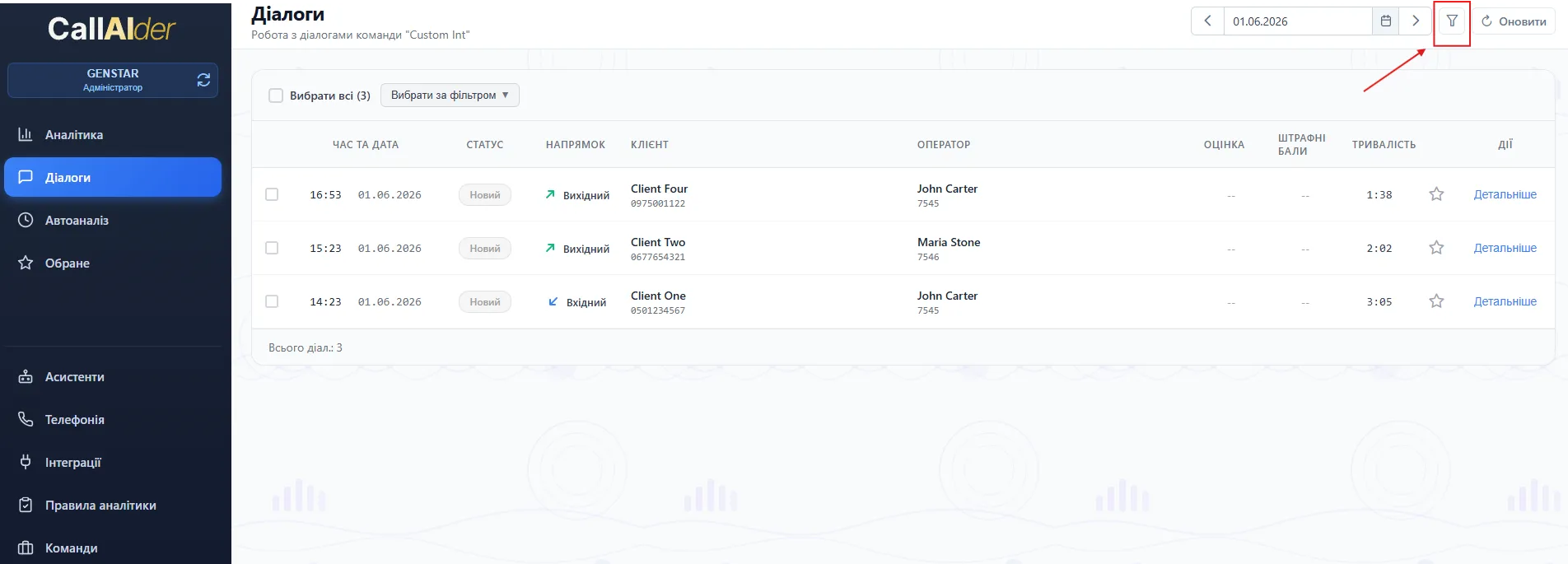
The panel includes:
- standard filters (direction, operator, client, duration);
- additional Call properties filters based on
properties.
Troubleshooting
401 Unauthorized
Check secret key value in both platform settings and backend validation.
404 on /health, /contacts, or /calls/:id/recording
Check base URL, route registration, and external accessibility.
Empty import from /calls
Check timestamp units (seconds), direction values, operator mapping, and filter strictness.
Properties missing in UI
Check /properties/schema availability and exact key match with calls[].properties.
Recording link not working
Check URL reachability, TTL, and MIME type.
Final launch checklist
/health,/contacts,/calls,/calls/:id/recordingimplemented.X-Secret-Keyvalidated on all endpoints./callsreturns completed calls only.propertiesis stable and type-safe./properties/schemaimplemented when flexible import filters are needed.- schema keys and payload keys are aligned.
- team import is validated in Dialogs.
- additional filtering works both during import and in dialogs panel.
If all checks pass, the integration is production-ready and analytics is reliable.