
Assistant webhooks let you receive server-side session lifecycle events in your external systems: CRM, BI, data warehouse, or integration gateway.
This guide covers the technical details end to end: which events are sent, which headers to expect, how to verify signatures, what payloads contain, and how to process events safely on your backend.
When a webhook is useful
Use webhook delivery when you need to:
- trigger post-processing when a dialogue ends;
- store transcripts in your own system;
- sync session statuses with your CRM;
- build your own analytics funnel outside the platform UI.
Step 1. Configure webhook in the assistant
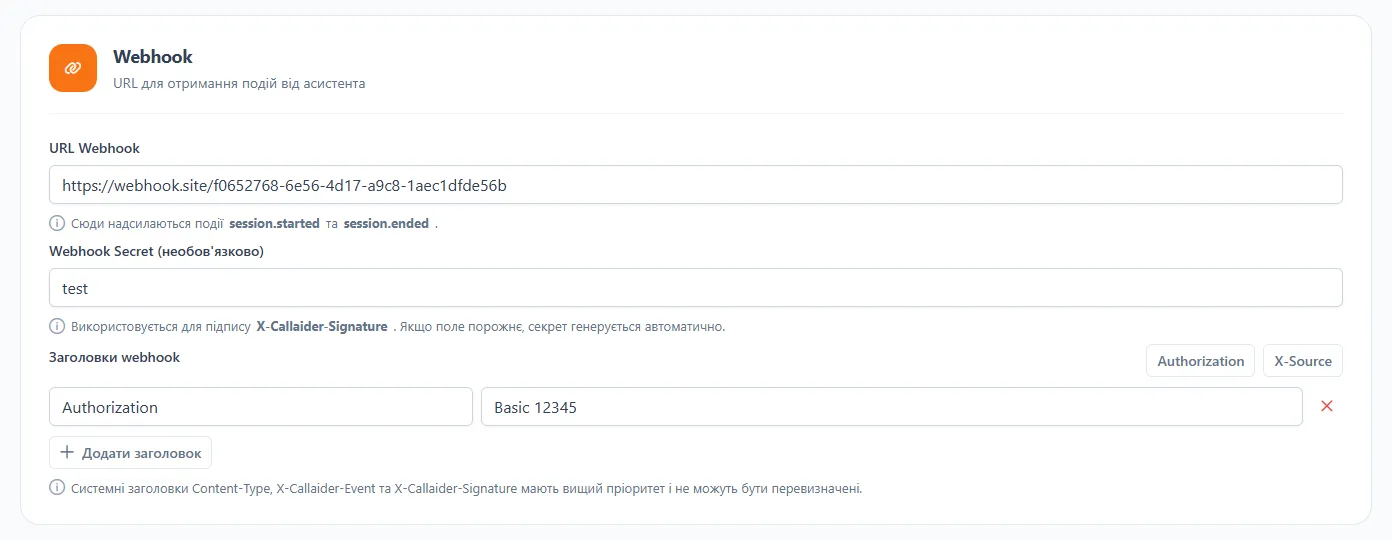
In the assistant settings, fill in:
webhookUrl- your endpoint URL for event delivery;webhookSecret(optional, recommended) - secret forX-Callaider-Signature;webhookHeaders- extra HTTP headers, for exampleAuthorization: Basic 12345.
If webhookSecret is left empty, a secret can be generated automatically.
If
webhookUrlis not set, events are not sent.
Which events are sent
Only two server-side events are delivered:
session.startedsession.ended
HTTP request and headers
Request parameters:
- Method:
POST - Body:
application/json - Format: JSON payload
System headers that are always included:
Content-Type: application/jsonX-Callaider-Event: <event_name>X-Callaider-Signature: sha256=<hex>(ifwebhookSecretis configured)
Custom headers from webhookHeaders are appended too, but there is an important priority rule:
- system headers have higher priority;
Content-Type,X-Callaider-Event, andX-Callaider-Signaturecannot be overridden viawebhookHeaders.
Step 2. Validate events quickly via webhook.site
For a quick test, temporarily paste a webhook.site URL into webhookUrl.
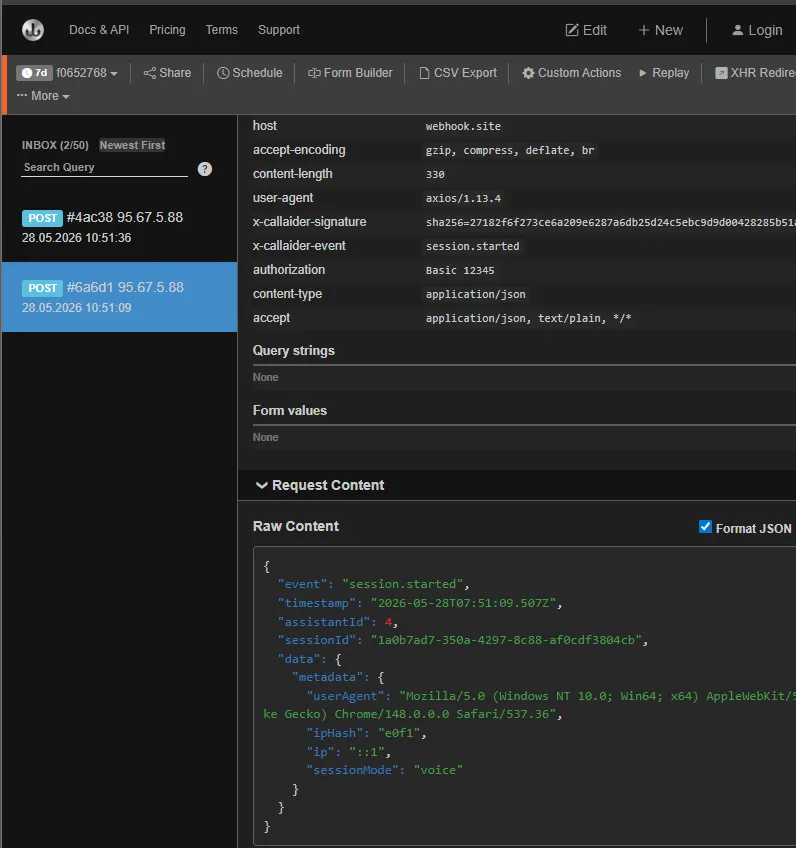
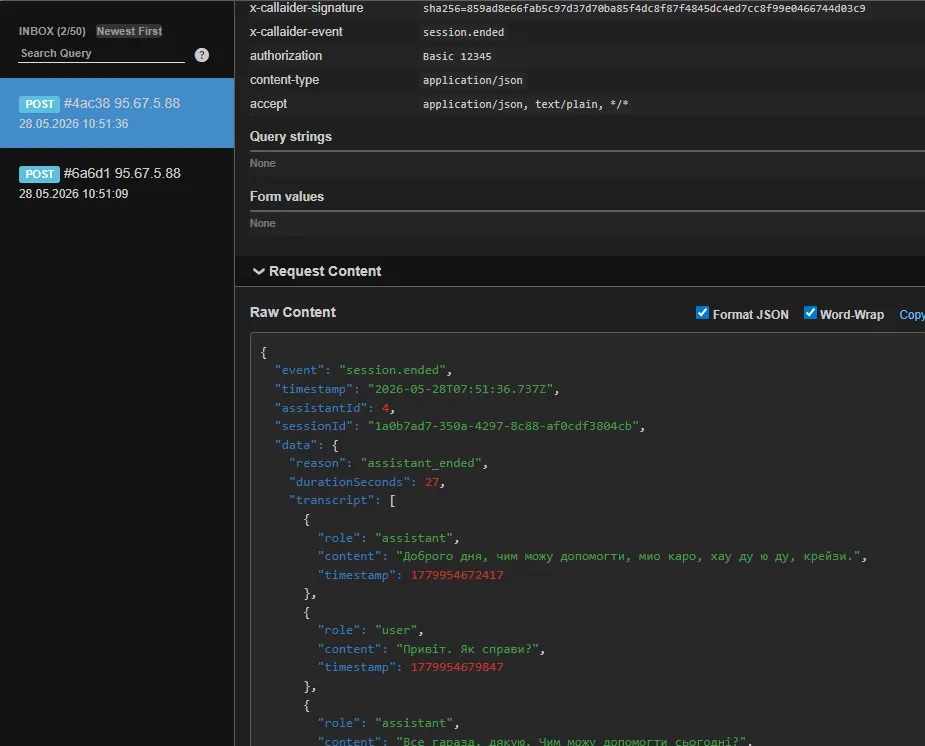
After a test session, you should see separate POST requests for session start and session end.
Example session.started request:
Example session.ended request:
Payload structure
General format:
{
  "event": "session.started | session.ended",
  "timestamp": "2026-05-28T12:34:56.789Z",
  "assistantId": 123,
  "sessionId": "2d7b8f7f-2de0-4db9-ae6f-9a1f8d98f6d2",
  "data": {}
}
session.started event
data contains session metadata:
{
  "metadata": {
    "userAgent": "Mozilla/5.0 ...",
    "sessionMode": "voice | text",
    "callId": "optional"
  }
}
Important notes:
metadatacomes from session creation context;metadata.sessionModecan bevoiceortext;- exact
metadatafields vary by session source (widget, web app, telephony, and so on).
session.ended event
data contains final session results:
{
  "reason": "assistant_ended",
  "durationSeconds": 27,
  "transcript": [
    {
      "role": "assistant",
      "content": "Hello, how can I help you?",
      "timestamp": 1779954672417
    },
    {
      "role": "user",
      "content": "Hi. How are you?",
      "timestamp": 1779954679847
    }
  ]
}
Fields:
reason- end reason (assistant_ended,user_ended,client_disconnect,timeout, and so on);durationSeconds- session duration in seconds (whenstartedAtandendedAtare available);transcript- accumulated array of session messages.
transcript item format
{
  "role": "user | assistant | system | tool",
  "content": "text",
  "timestamp": 1716900000000,
  "toolCall": {
    "name": "optional",
    "arguments": {},
    "result": {},
    "error": "optional"
  },
  "files": [
    {
      "gcsUri": "gs://...",
      "mimeType": "application/pdf",
      "filename": "document.pdf"
    }
  ]
}
toolCall and files are present only when applicable for that message.
Verifying X-Callaider-Signature
Signature verification helps you confirm two things: the request really came from CallAIder and the payload was not modified in transit.
“HMAC does not encrypt data, but it gives cryptographic proof of payload integrity and shared-secret possession.”
Signature validation is optional:
- if you want additional security control, validate it;
- if your use case does not require it, you can process webhook events without signature validation.
You will receive the signature in this header:
X-Callaider-Signature: sha256=<hex_digest>
The signature is calculated as HMAC SHA-256 over the raw JSON body.
Validation steps on your server:
- Read the raw request body without changing formatting.
- Compute HMAC SHA-256 with your
webhookSecret. - Compare it with
X-Callaider-Signatureusing a constant-time check.
Node.js (Express) example:
import crypto from 'node:crypto';
import express from 'express';

const app = express();

app.post(
  '/assistant-webhook',
  express.raw({ type: 'application/json' }),
  (req, res) => {
    const rawBody = req.body as Buffer;
    const signature = req.header('x-callaider-signature') || '';
    const event = req.header('x-callaider-event') || '';

    const secret = process.env.CALLAIDER_WEBHOOK_SECRET || '';

    if (secret) {
      const digest = crypto
        .createHmac('sha256', secret)
        .update(rawBody)
        .digest('hex');

      const expected = `sha256=${digest}`;
      const valid =
        signature.length === expected.length &&
        crypto.timingSafeEqual(Buffer.from(signature), Buffer.from(expected));

      if (!valid) {
        return res.status(401).json({ ok: false, error: 'Invalid signature' });
      }
    }

    const payload = JSON.parse(rawBody.toString('utf8'));

    // Recommended idempotency key: `${payload.sessionId}:${payload.event}`
    // Then enqueue async processing

    return res.status(200).json({ ok: true, event });
  }
);
Recommended production processing pattern
To keep integration stable under load:
- If you use
webhookSecret, validate the signature before business logic. - Deduplicate events by
sessionId + event. - Return
2xxquickly, move heavy processing (CRM, AI post-processing, archival) to a queue. - Apply payload size limits because
transcriptcan be large. - Log parsing failures separately for
session.startedandsession.ended.
Event routing example
switch (payload.event) {
  case 'session.started':
    // create/update active session record
    break;
  case 'session.ended':
    // persist transcript, durationSeconds, reason
    // trigger post-processing in background
    break;
  default:
    // ignore unknown events
    break;
}
Pre-production checklist
webhookUrlis reachable from external network.- Endpoint consistently responds faster than 3000 ms.
- If needed,
webhookSecretand signature verification are enabled. - Idempotency is implemented (
sessionId + event). - Alerts for endpoint
4xx/5xxare configured. - Both events are tested:
session.startedandsession.ended.
Conclusion
CallAIder assistant webhook is a simple and reliable way to get session lifecycle data on your backend. A basic integration needs only one endpoint, and a production-ready setup should add signature handling, deduplication, and async processing.
If you are starting from scratch, validate payloads with webhook.site first, then switch webhookUrl to your production endpoint.